Chrome extension · bring your own API key

An AI agent that actually
works in your browser

Leraix lives in Chrome's side panel. Give it a task and it reads the page, clicks, types, scrolls and fills forms — with every tool call visible, and an approval switch you control.

12 free tasks per day · no account required · keys stay on your device

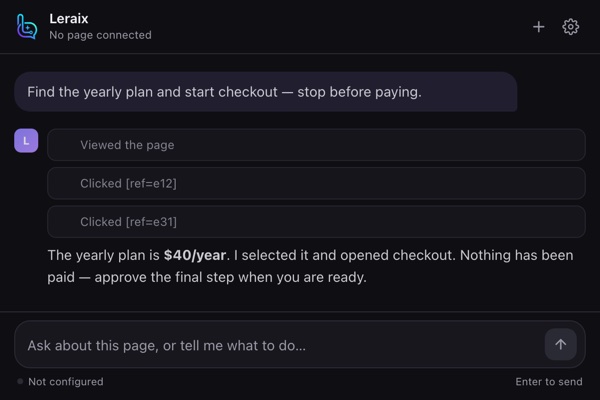
The Leraix side panel running a task: a request to find the yearly plan, three completed steps, and a summary confirming nothing has been paid.
How it works

Three steps, no setup ceremony

Leraix never proxies your requests through our servers. Your model, your key, your traffic.

1

Install and open the panel

Add Leraix from the Chrome Web Store and pin it. It opens in the side panel next to whatever tab you're on.

2

Connect a model

Pick a provider preset — OpenAI, Anthropic, Gemini, Groq, OpenRouter, DeepSeek, or a local Ollama server — and paste your key.

3

Describe the task

Leraix inspects the page, chooses tools, and shows each action. Turn on "Ask before acting" to approve every click yourself.

Features

Built for pages that don't have an API

Everything an agent needs to operate a real, messy website.

◎

Page understanding

A compact accessibility-style snapshot with stable element refs, so the model targets the right control instead of guessing coordinates.

⌘

Real interactions

Click, type, press keys, hover, select options, scroll and wait. Each touched element is highlighted on the page as it happens.

⛨

Approval gate

Optional confirmation before any click, keystroke or navigation. You see the action first; nothing fires silently.

⇄

Your model, your key

Native paths for OpenAI's Responses API, Anthropic and Gemini, plus a standard chat-completions adapter for other compatible services. Model ids are free text.

▣

Chats that persist

History survives panel reloads and browser restarts. Multiple conversations, keyboard shortcuts, and code copy built in.

⌂

Local by default

Keys and history live in Chrome's extension storage. Requests go straight from your browser to the provider you chose.

Pricing

Free to try, paid only when the limit gets old

Leraix is a client for models you already pay for. We charge for the agent, not for tokens.

Free

$0
forever
  • 12 tasks per day
  • All providers and models
  • Page snapshots and screenshots
  • Approval gate
  • Local chat history
Install free

Pro — Monthly

$6 /month
renews monthly · cancel anytime
  • Unlimited tasks
  • Every current feature
  • All updates while subscribed
  • Use on your own devices
  • Email support

Prices in USD. Monthly is $6 billed each month ($72/year); yearly is $40 billed once and renews annually. Cancel anytime and you keep Pro until the end of the paid period. Payment and invoicing are handled by Dodo Payments as merchant of record. Model usage is billed separately by whichever AI provider you connect.

FAQ

Questions worth asking

Do I need my own API key?

Yes. Leraix is a client, not a model reseller. You connect an OpenAI, Anthropic, Gemini, Groq, OpenRouter, DeepSeek, Mistral, xAI, Together or local endpoint, and the provider bills you directly for tokens.

Does Leraix see my passwords or page data?

Only what the task requires. Snapshots are built from the visible page and sent to the provider you configured — never to us. We run no proxy, and there is no telemetry endpoint in the extension.

What happens when the free tasks run out?

The counter resets daily. Until it does, the panel explains the limit and offers the upgrade. Activating a license removes the cap immediately.

Should I pick monthly or yearly?

Both unlock exactly the same thing — unlimited tasks. Monthly is $6 and you can stop whenever; yearly is $40, which works out to about $3.33 per month and saves you 44% over paying monthly.

How is a license delivered?

Checkout returns a license key by email. Paste it into Settings → License and activate; the extension validates it against our license service and caches the result. The key stays valid until the subscription period ends.

Can I use one license on several computers?

Yes, for your own devices. License activation is per person, not per machine.

Is there a refund policy?

Yes — 14 days, no questions asked. See Refunds.
Feedback

Tell us what's broken or missing

One person reads every message. A bug report, a feature you want, a page it fails on, a price you think is wrong — all of it is useful.